
Chrome extension · Early access
Canlah GEO — AI Answer Monitor
Is AI naming your brand? Canlah GEO asks ChatGPT and Google AI Overviews the questions your buyers type, then shows whether the answer names you, who it names instead, and which sources it cites.
Works with ChatGPTGoogle AI Overviews
Install from the Chrome Web Store No download needed, and it updates itself · How to install
Chrome extensions install on a computer, not a phone. Get your code here (it goes to your inbox) or note your invite code, then install it from the Chrome Web Store on your laptop.
A friend invited you
Your invite code
Your invite code is your access code, so there's nothing else to claim. Install the extension from the Chrome Web Store and sign in with Google; the setup steps usually fill in the code for you (paste it in if not). Once you're in, you and your friend each get 7 more trial days.
A real ChatGPT answer · “What are the best AI tools for customer support at a B2B SaaS startup?”
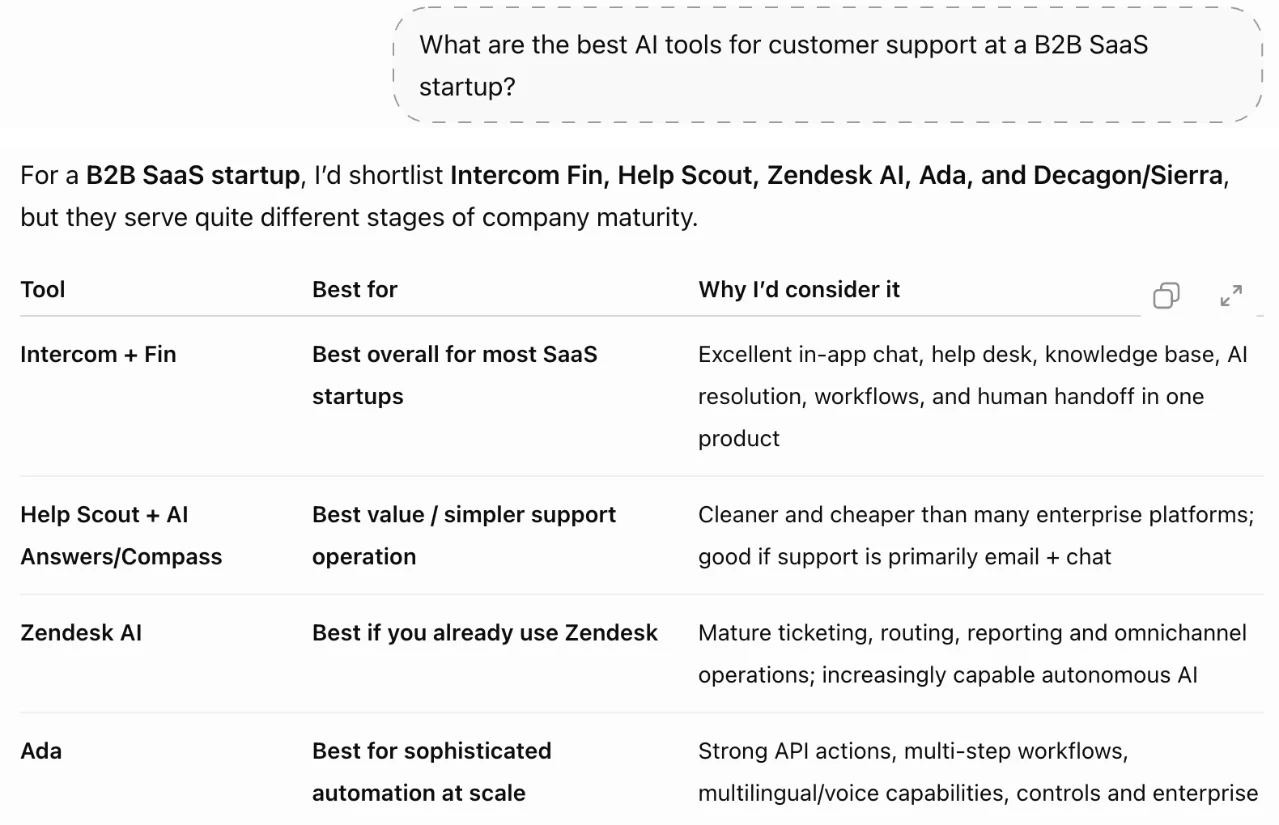
Demo · 74 sec
What it shows you
-
Are you in the answer?
Whether ChatGPT or Google AI Overviews names your brand when a buyer asks, and where it places you.
-
Who gets named instead
The competitors named in the same answer, so you see who AI hands your buyer to.
-
Which sources it cites
The websites the answer cites, and whether your own site is one of them.
Install
It's on the Chrome Web Store. Install it from there and it keeps itself up to date:
- 01
Open the store page
Click “Install from the Chrome Web Store”, then “Add to Chrome” on the store page, then “Add extension”.
- 02
Pin it
Click the puzzle-piece icon in the toolbar and pin “Canlah GEO — AI Answer Monitor”, so its results are one click away.
- 03
Sign in with Google
The settings page usually opens by itself once it's installed; if not, click the extension's icon. Sign in with Google.
- 04
Enter your code
Enter your access code or invite code in the setup steps, then add your brand and the questions to watch.
Can't use the store? Install the package by hand
- 01
Download and unzip
Click “Download the package” and unzip it into a folder you'll keep. Don't delete or move it later: Chrome loads the extension from that folder every time it starts.
- 02
Turn on Developer mode
Type chrome://extensions into Chrome's address bar, press Enter, and turn on Developer mode (top right).
- 03
Load the extension
Click “Load unpacked” and choose the folder you unzipped (the one that shows manifest.json when you open it).
- 04
Sign in and enter your code
Click the puzzle-piece icon in the toolbar and pin “Canlah GEO — AI Answer Monitor”. Open it, sign in with Google and enter your access code or invite code in the setup steps.
An extension installed by hand doesn't update itself. When there's a new version, the download here is replaced: unzip it over the old folder, then click the reload button on the extension's card in chrome://extensions.
SHA-256 b54d7cc2ffab50db56fb3f4a415a50afd82132a0e6443531bdd5d6f94a180707
How it works
- 01
Get a code and install
Get an early-access code by email and install the extension from the Chrome Web Store. Sign in with Google and enter your early-access code.
- 02
Set what to watch
Your brand, your website, your competitors and the questions your buyers ask. Five to ten questions is enough to start.
- 03
It runs in your own Chrome
When you step away, it asks the questions you wrote, plus any task questions you chose to take on, a set number of times a day (at most 20 per question). If you're signed in to ChatGPT it uses your account, in a temporary chat with personalisation off; if not, it asks as a signed-out visitor. Chrome needs to be open and your computer awake.
When you see numbers
Each answer is there to read, word for word, as soon as it's collected. Your first percentage appears once 10 answers are collected; below that, a percentage is noise. Every number opens to the AI's own words.
Your data
It reads the answer shown on the page and sends the questions it asked (the ones you wrote, plus any task questions you chose to take on), the answers and their citations to Canlah's servers, which count how often your brand is mentioned, where it ranks and which sites are cited. We don't sell this data or use it for personalised ads.
When you use ChatGPT or Google Search yourself, the extension reads and records nothing. It reads only the answers in the monitoring tabs it opens.
Extension privacy policyBe first to see what AI says about you.
Get an early-access codeRather have us do the work?
Our GEO service puts our team on it: we lock your buyer questions, work on the pages and sources AI reads, and re-test every month.
See the GEO service