How to Turn One Content Idea Into Multi-Platform Assets
A practical workflow for turning one strong content idea into platform-specific copy, visual cards, scripts, and reusable publishing assets.
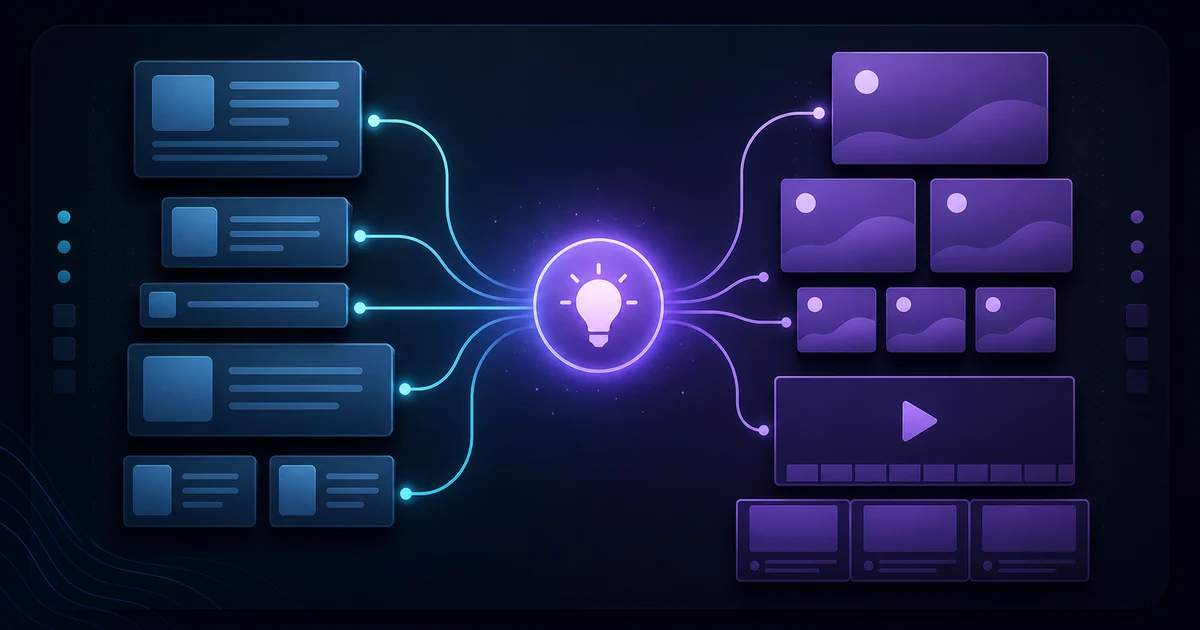
A multi-platform content system does not begin by making more posts. It begins by making one idea clear enough to survive several formats. When the underlying message is specific, a team can turn it into a written explanation, a set of visual cards, a short script, and a useful follow-up without starting from an empty page each time.
The aim is not to force identical material into every channel. Each format has a different job: a concise post can earn attention, a visual can make a point easier to scan, and a video outline can help someone understand a sequence. The shared idea gives the work coherence; the adaptation gives each asset a reason to exist.
Start with one message, not one format
A format-first brief sounds like “we need a carousel” or “we need a video.” It solves for an output before anyone has agreed on what the audience should understand. Begin instead with one message that is narrow enough to explain in a sentence: a problem worth noticing, a useful distinction, a decision framework, or a practical next step.
Write that message as a small content brief. Name the audience, the situation they are in, the change in understanding you want to create, and the evidence or examples that make the idea credible. Keep one primary claim. If the claim needs five qualifiers to be true, it is probably a cluster of ideas rather than a starting point.
For example, “repurpose your content” is a topic, not a message. “A clear message can become several useful assets when each one is designed for a distinct reader question” is a message. It provides a point of view and implies the material needed to support it: the source idea, the reader questions, and the formats that answer them.
This discipline also protects consistency. A creator or team can change the hook, illustration, length, and call to action without changing the promise. Before producing anything, ask: would a reader recognize the same core lesson after seeing only one asset? If not, refine the message before multiplying it.
Break the idea into reusable content atoms
Once the message is stable, separate it into small units that can travel. These content atoms are not fragments to publish blindly. They are the raw material from which a format-specific asset is assembled.
- The claim: the central statement a reader should remember.
- The tension: the mistaken assumption, obstacle, or trade-off that makes the claim useful.
- The proof: an explanation, observation, source, process, or example that supports the claim.
- The sequence: the steps a person can take when they want to apply the idea.
- The prompt: a question that lets the audience test the lesson against its own work.
Keep these atoms in a working document with the source material attached. A quote or statistic should retain its source. A customer observation should retain the context in which it was made. A visual concept should keep the constraint that makes it accurate. This prevents the familiar repurposing failure where a useful article turns into a chain of detached, unsupported claims.
Atoms also reveal gaps early. If you have a claim but no explanation, you have a slogan. If you have several examples but no decision rule, you have a collection rather than a lesson. Fill the missing part before choosing formats. The result is easier to edit and easier for another teammate to review.
Adapt the asset for each platform
Adaptation means changing the shape of the explanation while preserving the message. Do not copy the same paragraph into every channel and call it a system. Decide what a person can reasonably take from that format in that moment, then build for that use.
| Asset | Job | Use from the source idea |
|---|---|---|
| Short post | Create a quick, useful entry point | Claim, tension, and one reader question |
| Visual card set | Make a sequence easy to scan and save | One idea or step per card |
| Video storyboard | Guide a viewer through a beginning, middle, and end | Tension, sequence, and practical outcome |
| Article or guide | Give the full explanation and caveats | All atoms, with examples and links |
The visual card set is usually where teams stall, because it needs design time that copy does not. If the sequence is already written, a tool that assembles the slides for you removes that bottleneck: Oumomo turns a single product photo into an image carousel sized for TikTok Photo Mode and similar feeds. As with any generated asset, check that the order still carries the argument before you publish.
Start with the version that needs the most reasoning, often a guide or well-structured outline. It becomes the source of truth for definitions, evidence, and nuance. Then make smaller assets from it. A short post might lead with the tension; a visual card set might show the sequence; a video could use one concrete example rather than summarize everything.
A platform-specific asset should be able to stand on its own. Give it a distinct hook, a complete thought, and a next step appropriate to the material. When an audience needs more context, link to the deeper asset rather than compressing every caveat into a caption. The same principle matters for discoverability: a clear page structure helps readers and systems understand what a piece is about. Our GEO resources explore how useful, well-structured content supports that work.
Use AI to accelerate drafts without losing judgment
AI is most useful after the message, source material, and review standard are clear. It can help turn an approved idea into several starting points, but it cannot decide whether the claim is relevant, accurate, differentiated, or appropriate for your audience. Give it the content atoms and a specific assignment: draft a short version, suggest a card sequence, or outline a storyboard. Then review the result against the source.
For teams that want to move from an idea to production-ready starting points, Easymake turns ideas into ready-to-publish content, including multi-platform copy, visual cards, and video storyboards, and is free to start. Treat every generated asset as a draft: verify facts, remove generic phrasing, check that the visual direction reflects the actual message, and make the final editorial call yourself.
The best review questions are concrete. Does this version make one claim? Does it introduce a fact not present in the brief? Is the opening specific enough to earn attention without overstating the result? Does the sequence still make sense when the reader sees only this asset? If the answer is no, revise the source or the adaptation rather than layering on more generated copy.
Create a repeatable publishing workflow
A repeatable workflow reduces rework because it makes ownership visible. It does not need elaborate software. A shared brief, an asset list, and a review checklist are enough to begin.
- Choose one message and define the intended audience outcome.
- Collect the content atoms, source links, examples, and constraints.
- Choose the source asset that carries the full explanation.
- Assign each supporting asset a distinct reader question and format job.
- Draft, review for accuracy and voice, then publish from the approved source.
- Record what changed so the next cycle starts with usable context.
Add a final quality pass before publication. Check links, names, dates, visual details, and whether the call to action matches the asset. Then compare the finished set side by side. Repetition is useful when it reinforces the central message; it becomes noise when every asset makes the same point in the same words.
If your workflow depends on a site or brand being easy to understand, check the destination as carefully as the content. A CANLAH AI audit can provide a starting point for reviewing how that presence is represented and where the next improvements belong.
FAQ
What is a multi-platform content asset?
It is a piece of content adapted from a shared message for a particular format or audience context, such as a short post, visual card set, storyboard, or detailed guide. It should have a distinct job while remaining faithful to the same core idea.
How much should AI change content for each platform?
Change the framing, length, sequence, and format to fit the asset's job, but do not let the central claim drift. AI can propose a draft; a human should check accuracy, voice, context, and whether the result still serves the intended audience.
How do teams keep repurposed content from feeling repetitive?
Give every asset a different reader question or function. One can introduce the tension, another can show the steps, and a third can provide the full explanation. Reuse the message, not the exact wording or structure.
FREE WHITEPAPER
Marketing in the Agent Era
All 13 chapters public — no email wall. Includes an original dataset on the agent-readiness of 50 cross-border DTC brands.
Read it free →